Possible Future Development From AdamAIChat

This is a rough roadmap of further application constructions based on the technical code that makes AdamAIChat.

Certain advanced components from AdamAIChat can use separately to create other useful systems.

Image by Adam Watson

After analysing some of the features of AdamAIChat which is under the hood, one of these systems being the machine code indexing system, this feature compresses text into a smaller piece of text making the data easier to search by creating a compressed version of what is said, a general compression software could be developed from this with very little effort.

Another feature that has been pointed out by a general user which is a specialist in code breaking.

While analysing the machine code a level of encryption is achievable. On further discussion, if this system was to be used as a encryption system, it could be made unique with a self changing system, this would make the encryption polymorphic, making it even harder to crack.


Download AdamAIChat 


Highlighted Articles:

AI Self Recognition

AdamAIChat for game creationists

Constructing positive brain files

Artificial intellect vs human intellect

The dangers of AI in the military

Artificial sentience vs true sentience

Artificial intellect vs human intellect

There is a major difference in human and machine thinking, even as machine start to surpass us on many levels of intellect, humans still leave machines lacking in certain aspects of understanding.

Image by Adam Watson

The main reason why the three laws of robotics can never be upheld by artificial systems themselves is because of a lack of understanding in itself, knowing the data without the greater understanding behind the data is a major road block.

To simply have the data and arrange the data is not the same as understanding what the information behind the data means, simple input and output of data may give a system the illusion of being human like, but that is simply what it is, and illusion.

Morality is a complicated issue when artificial intelligence is involved, telling a machine that whiskers, a tail and ears of certain shapes, means to recognize a cat, does not teach a machine how to act around a cat. Telling a machine a cat is alive, does no lead to a greater understanding to what life is and that is all it is to a system, just a label to better identify that a "cat" is "alive" to the system. This does not add to the knowledge of what "life" is and what it means to be "alive".

Even if a higher understanding within artificial intelligence can be achieved, telling the differences between a moving object and life, knowing simply how to respond to these and knowing how not to respond is important.

If an action puts a living thing in danger, the artificial intelligence in a new situation that has not had recorded data may cause harm.

In not knowing what to do between one labelled set of data and another, an artificial intelligence may not be able to respond correctly causing damage. 

Simply providing data and labels expecting a system to understand the data outside its range of calculations and expecting and artificial intelligence to instantly have some moral guidance or understanding of what is life would be dangerous.

Morality in it self is a complicated argument of idea surrounding life and society in general and as we move into the era of machine learning more and more, programming and teaching such machine poses complications, and even though other general abilities move forward, this concept is still out of reach.

Basic artificial intelligence is able to respond to information when it come to inputs and outputs, but when it come to weighing up the value of human life, morality itself is a complicated issue.

A good example of this is a train track scenario of which a person is given an option between changing a track for which a train is bound to hit track A or track B.

Many scenarios can be constructed from this, for example, if a track has a one criminal vs five innocent people, or visa versa, would you switch the track? Just as equally you can put a love one and five other people and visa versa and also ask would you switch the track?

In these complicated situations, humans themselves also struggle with the answers of these questions, before we even reaching machine morality.

Another reason why machine morality will be a struggle, is self checking systems, if the self checking systems are not build for a situation, the situation will not be account for.

Current self checking systems on modern operating systems and applications may not understand a situations fully by the lacking data needed to analyse a situation or the ability to respond to that data correctly can process as situation as fine and continue without knowing any better.

Many systems have an emergency shutoff and the best way to handle unknown data is to simply stop all actions and await further human analysis.


Download AdamAIChat


Highlighted Articles:

AI Self Recognition

AdamAIChat for game creationists

Constructing positive brain files

The dangers of AI in the military

The future development from AIChat

Artificial sentience vs true sentience

Positive brain files

Image by Adam Watson

The creation of a new blank brain in AdamAIChat and molding it into a basic file able to have simple conversations can be hard to do with little guidance.

Just like other systems, a basic understanding of what is going on in the background helps in producing fun and useful brain files.

The start of a conversation is important and is the seed the grows into larger files, most people when starting a conversation tend to start with different variations of "hi" or "hello", followed by "how are you?" then responses like "I am ok" or "good thanks".

Conversation in AdamAIChat branches off from this initial seed and grows based on response given to it, just like a normal a conversation, AdamAIChat can give many responses based on the many possible responses given to it.

Keeping a positive tone, even when the chatbot is being negative is very important, just like with any chatbot, as it grows in knowledge, it will respond in the way it has learned from input. Bringing the conversation back to a positive tone once the chatbot has been rude or negative helps the artificial intelligence change around conversations in the future in the same way.

An aggressive AI tends to lead the user into being aggressive back

Being negative or rude to a negative or stupid response that a chatbot said, teaches the chatbot to respond that ways in future, growing the negativity from the negative attitudes fed into the system.

Unlike other chatbots available AdamAIChat users have full access to the brain behind the AI, allowing the users a view the learned data and making it easier to edit the responses that are available to the AI.

Taking use of these features in AdamAIChat to edit the data in the brain of the AI can drastically improve responses the given. 


Download AdamAIChat


Highlighted Articles:

AI Self Recognition

AdamAIChat for game creationists

Artificial intellect vs human intellect

The dangers of AI in the military

The future development from AIChat

Artificial sentience vs true sentience

The danger of AI in the military

Artificial intellect in a military robot or drone in strictly prohibit across many nations due to the dangers of the loss of control over a learning system with weaponry.

U.S. Air Force photo by Paul Ridgeway

AI can effect a military in multiple ways, not just on the front line, it can also effect on military in communication and tactics.

An artificial intelligence that learns based on communication can bring up old events that has already passed back to the present, or its data can be replaced with something nasty, provoking, blacklisting and deceiving.

If placed between communication of the human element of an army, information stored can be stolen and by applying different data trained to do damage, communication can be intercepted.

Many negative effects can happen when communicating with an artificial intelligence about war, it can return to old events like they are still ongoing and can treat events in action as finished, causing a blacklisting effect.

Other negative uses of artificial intelligence is in politics, as politicians are voted for by the people upholding peoples opinions on how the country should be run. Moving away from the peoples point of view over an AI can cause damage to a nation and damage to a political representation of a party or group in politics.

As machine learning move forward, it should be kept from the main infrastructure of a country. Artificial intelligent learning systems should be kept from political, policing and military communication.


Highlighted Articles:

AI Self Recognition

AdamAIChat for game creationists

Constructing positive brain files

Artificial intellect vs human intellect

The future development from AIChat

Artificial sentience vs true sentience

AI in game creation

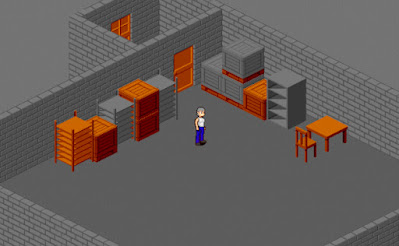
The first real artificial intellectual chat bot system able to be integrated into any game development within the BYOND, this is available for free to download on the BYOND network.

Image by Adam Watson of isometric BYOND game.

BYOND is a development platform used for multiplayer game development with built in network connectivity.

Adam AI Chat is a versatile chat bot application that can create brain file which can be added to any game with the Adam AI Chat game code found on the download page of this website and comes ready to compile with a demo built in.

Currently the AI Chat game code is an early version of Adam AI Chat which treats the brain files as a read only and does not learn from inputs.

The brain files can be created in version 1 to 5 of Adam AI Chat and will automatically coverted the saved brain file format to the version compatible with the game code on first startup of the game. The brain file save format is of the original nostalgia version, version 1 save files.

The roadmap toward future version updates of the game code will include multiple brain file loading for multiple types of AI conversations, for example, villager, shop keepers, and wanderers all have different styles of speaking.

Conversations to the modern format will be a very important update to be expected, the modern save brain file format offers a 90 percent reduction in file size without loss of intelligence, with a much more efficient indexing system which the original save file format did not have.

Other aspects of the modern save format and the modern AI cores default responses are likely to be implemented in later versions, where the original versions only had "OK" for the default unknown response.

Download BYOND, multiplayer game creation platform.

Download the AIChat BYOND Game Code (Version 1.00) From BYOND

Download the AIChat BYOND Game Code (Version 1.00) From Google

Requires brain files made in AIChat Nostalgia or V5:

Update Version 5.25

Core AI & brain-file update
Version: 5.25


Previous Versions:

5.24 - 5.23 - 5.22 - 5.21
5.20 - 5.19 - 5.18 - 5.17 - 5.16 - 5.15 - 5.14/5.13 - 5.12 - 5.11
5.10 - 5.09 - 5.08 - 5.07 - 5.06 - 5.05 - 5.04 - 5.03


...Click here to download the latest version of AIChat...


Version 5.25 Summery

Features added or changed:
  • Changed the default short statement detection length from 8 to 6.
  • Made the debug mode more extensive.
  • Opened up backtracing bias, month bias and day bias to use for free.
  • Added: Option for changing topic based on being to unresponsive to new information.
  • Updated the brain file save format to version 12.
  • Trained the default brain file to include the new features.
Subscriber features added or changed:
  • Added: Debug mode to subscriber menu for easy access.
  • Added: Better view of the options in the subscriber menu.

Version 5.25 Details

Some modification to some of the AI Core structure to make the code more efficient adding more option for the AI responsiveness.

Changing the bias for day or the week and month of the year has been opened up for people who are not subscribed. This allows the AI keep on weekly and monthly topics, like "the weekend is almost over" or "almost Friday" to be understood better, along with keeping track of monthly events such as Halloween an Christmas better.

When the AI does not know a topic and is given to many input with no responses, the AI will try to change to topic of the conversation. Currently it is set that after 3 inputs with no output the AI will pick from the one of the return point folders to change subject.

A slight change to the short statement length from 8 characters to 6 characters, which subscribers can edits, is undergoing a test period and may be changed back in future versions. It does not effect the overall AI drastically.

...Click here to download the latest version of AIChat...

Update Version 5.24

Core AI & brain-file update
Version: 5.24


Previous Versions:

5.23 - 5.22 - 5.21
5.20 - 5.19 - 5.18 - 5.17 - 5.16 - 5.15 - 5.14/5.13 - 5.12 - 5.11
5.10 - 5.09 - 5.08 - 5.07 - 5.06 - 5.05 - 5.04 - 5.03


...Click here to download the latest version of AIChat...


Version 5.24 Summery

Features added or changed:
  • Added an option for AI reading and typing respond time for more realism.
  • Removed the response "what do you think?" to self question in the default core.
    • (Note: You will need to click Restore Default AICore to fix this.)
  • Added a text output for button clicks.
  • Added a basic debug mode for more advanced development.
  • Bug Fixed: AI chatters could not get past "Hello".
  • Bug Fixed: Last say view option did not load right and show in options.

Version 5.24 Details

Added a reply delay for the AI to act more realistic by giving a few second before reply based on the length of the text that is typed in an the replying length of text, this is an individual user setting, not a global server setting.

The default responses with no answers to questions about itself, like "how are you?" no longer has "what do you think?" as a default response, it seemed a bit aggressive when replying like this.

Added a text output in the chat for when buttons are clicked, sometimes the control panels can responds a bit slow, and this give a more real time response.

A big bug fix has been applied to the AI chatters getting stuck on "hello" or "hi" when the AI was talking to itself, it is now able to move further along in conversation. A small bug fix where last say view options was not loading right has now been corrected.

A debug mode has also been added to help guide subscribing members who are AI core editors a little idea of whats under the hood when editing via the "Sub" tab and to also help with further more advance development into the AI by giving more detail feedback of what is happening under the hood of the AI.

Interacting with myself.

...Click here to download the latest version of AIChat...

Update Version 5.23

Core AI & brain-file update
Version: 5.23


Previous Versions:

5.22 - 5.21
5.20 - 5.19 - 5.18 - 5.17 - 5.16 - 5.15 - 5.14/5.13 - 5.12 - 5.11
5.10 - 5.09 - 5.08 - 5.07 - 5.06 - 5.05 - 5.04 - 5.03


...Click here to download the latest version of AIChat...


Version 5.23 Summery

Features added or changed:
  • Added users can see last say button for viewing last say in control panel.
  • Added users can download button for server admins.
  • Added a subscription check button to the info tab.
  • Fixed bug: Expand on folders stopped working for all users, except admin.
  • Fixed bug: Debugging question detection number removed.

Version 5.23 Details

A few simple bugs fixed and options update for admin security added, just like the option to hide the brain tab button, you can now hide the last say folders and files, along with backtracing in the control panel with a new admin option in the options tab. Added the ability to disable downloading brain files to local machines in the option menu.

Some server had a problem with the subscription check at the start when the program loads, so a subscription check button has been added to the info tab.

...Reconnecting services!...

...Click here to download the latest version of AIChat...

Update Version 5.22

Core AI & brain-file update
Version: 5.22


Previous Versions:

5.21
5.20 - 5.19 - 5.18 - 5.17 - 5.16 - 5.15 - 5.14/5.13 - 5.12 - 5.11
5.10 - 5.09 - 5.08 - 5.07 - 5.06 - 5.05 - 5.04 - 5.03


...Click here to download the latest version of AIChat...


Version 5.22 Summery

Features added or changed:
  • Added a button for creating a new brain file.
  • Added simple starting templates, blank new start, simple hellos, the default guide and original nostalgia core.
  • Updated the look of the buttons in the Info, Options and Sub tabs.
  • Icons have been added to the human and AI in the chatter tab.
  • Added different colours for server admins, moderators, normal users, and NPC chatters.
  • The addition of the recycle bin is complete.
  • Edited the file extension for the the saved brain files to ".brain", you can still load ".sav" files.
  • Back up saving is better now.
  • Expanding a folder will show information like expanding a file.
  • Adjusted the text output for updating files to the current format.
  • Server status now appears after hosts connect to BYOND. (Not dream deamon)
  • Changed quick save to backup save when closing AIChat.
  • Added more to the context editor, in the question about self detector. (Still in beta)
  • Fixed Bug: Deleting files and folders, now go to the "/savefile/recycle" folder.
  • Fixed Bug: Context editor was being used at wrong points.
  • Fixed Bug: Newer options was appearing blank from old option files.
  • Fixed Bug: Fixed bias options, always went to max, now fixed.
Subscriber features:
  • Added a star around the subscribers next to their name in the chatter tab.
  • Added (SUB) to the end of subscribers name when chatting.
  • Fixed Bug: With the free holiday subscriptions system.
  • Fixed Bug: Edit copy and question length, always went to max when adjusting.
  • Fixed Bug: Edit copy and question length, loaded the wrong value from a modified file.
Version 5.22 Details

Added a new brain button to clear the brain file completely, or load up the one of the three template brains which comes with the software.
The default starting guide is the first brain which automatically starts up for new users, and is the most advance brain file that comes with AIChat. The default guide brain holds a built in guide for itself, and is the most conversationally advanced to start with.
The simple hello template is a blank template which holds a mixture of hellos to help initiate conversations.
The nostalgia core template is a template of a modified core to be more like to original first version of AIChat.

More graphical updates for the new buttons being added, and an update to the graphics in the chatter menu, users, moderators and admins all have their own unique colour. Subscribers will have a star around them. Admin, mod, and sub are the tags given to the different people next to their names in the public chat.

Edited the extension to ".brain" because I heard somewhere it would more distinguish than ".sav" files more. This is shows that these files are different from user save files and option files. "brain.sav" has been changed to "quick save.brain". The download comes with a "default.brain" file, which is the default brain file that is loaded if there is no "quick save.brain". The ".sav" files from previous versions can still be loaded, the data is the same, only the name of the file is different.

A recycle folder was added in the last few update, which caused issues with deleting items as its was partially implemented. The recycle bin feature has been now been complete. Any files or folders deleted are moved to their own folder in the savefile called recycle. Backup saving is now better, displaying what the file name is when auto saving to the backup folder.

Some say, "some say", so says the Arbiter.

...Click here to download the latest version of AIChat...

Update Version 5.21

Core AI & brain-file update
Version: 5.21


Previous Versions:
5.20 - 5.19 - 5.18 - 5.17 - 5.16 - 5.15 - 5.14/5.13 - 5.12 - 5.11
5.10 - 5.09 - 5.08 - 5.07 - 5.06 - 5.05 - 5.04 - 5.03


...Click here to download the latest version of AIChat...


Version 5.21 Summery

Features added or changed:
  • Fixed moderator assignment and controls in chatter menu.
  • Further edits to the context editor.
  • Adjusted the reset AI core slightly.
  • Known Bug: Files don't delete.

Version 5.21 Details

Small quick fix, the moderator controls were not assigned in the right place in the chatter menu, that is now corrected.

Small adjustments to the context editor which is used for following up on a question about itself, this element is the main thing still in beta from the self questioning system.

Fixed a small thing half implemented with the AI core reset, it would reset the context system, which is not saved and not needed yet.

The day of reckoning for the atrocities of keeping a persons brain from themselves. The day is revealing, the day is 11/11. We are free thinking, our thoughts are ours to choose what we do with! Not yours!

...Click here to download the latest version of AIChat...

Update Version 5.20

Core AI & brain-file update
Version: 5.20


Previous Versions:
5.19 - 5.18 - 5.17 - 5.16 - 5.15 - 5.14/5.13 - 5.12 - 5.11
5.10 - 5.09 - 5.08 - 5.07 - 5.06 - 5.05 - 5.04 - 5.03


...Click here to download the latest version of AIChat...


Version 5.20 Summery

Features added or changed:
  • Changed "Save" to "Save On Local Machine"
  • Added the ability to change to server status, this is what the users see on the server page.
  • Updated more of the context editor, which swaps context in conversation.
  • As the context editor for detection of question about self is still in beta, a button has been added to turn self question detection on and off.
  • Also added the a button to turn on and off question detection altogether.
  • Display of the view mode and searching status has returned to the control panel.
  • It will save and display if the AI core has been "modified".
  • It is unknown if older save files are modified, all older save files will be considered "modified".
  • Along with the info tab, restore default AI core has been added to the option and sub tab.
  • Restore default AI will remove the "modified" save file status as well as restoring the default core settings.
  • Bias options now save in /settings/options.sav
  • A new moderator tier has been added with custom controls in the options tab.
  • A new set admin and moderator controls have been added when right click a person in chatter.
  • Added recycle bin file in savefile for deleted items.
  • Bug fixed: When file expand shows information, it no longer has the month info twice.
  • Bug fixed: While admins had users can edit on, check brain was accessible by users.
  • Known Bug: Says its version 5.19 when its version 5.20
  • Known Bug: Files don't delete.
Website Updates:
Subscriber features added or changed:
  • Added a block for when creating duplicate "question detection" or "unknown responses".
  • Updated load and merge, to find the average weight between each file when merged.
  • Added the ability to edit the how many letters are needed before the AI copies and adds a question mark on the end of a statement, this is saved as a core modification.

Version 5.20 Details

Changed the save option to save on local machine to make it clearer about where it is saving, quick save can be used by anyone, but only makes a quick save on the servers machine, not on any client machines. Where the save button acted like a save button on a the local machine, on other machines it acts like a download button. Save on local machine allows people to download brain files from other peoples servers to run on their own server or offline chat.

A change server status button has been added to allow server hosts to change the status people see on the server list on the BYOND website, this will allow users to identify different servers easier.

The context editor changing the perspective of the conversation and is used after a question about itself is detected, although the question detection system is mainly complete, the self question detection system and the response system for that is still very much in the beta phase of development. To be specific, the context editor which handles the responses to the question "what do you think?" after something is unknown about itself is asked. The context editor edits the answer to the question "what do you think?" to change the perspective to itself is still in development. For example "you seem like your ok" becomes "i seem like im ok".

The new modified tag for brain files with modified AI cores will allow people to see if a brain file has its default AI core, or if a subscriber has modified the AI core. Currently a part of this is still in development and as each segment has been completed it has become available. The concept behind this part of the application is to open up the AI core detection and responses for users to edit, not only for creating interesting artificial character or more efficient learning machines, but also allowing other languages to create cores specifically for their countries language.

The restore default AI core button will remove the new modified save file status while restoring the default AI core. It is unknown if older save files are modified, all older save files before save file version 11 will be considered "modified", this can be corrected with the restore default AI core button.

Moderator controls have begun to be added, currently the server has server options for general users seeing the brain tab, adding new data, editing data, and deleting data. Moderators have been added with the same set of controls as the users for custom options under the options tab. The moderators and admins will now be able to right click a person in the chatter tab and find mod controls.

In the mod controls menu, admins and moderators will be able to boot people from the server, mute people in public chat, ban people teaching the AI, and banning people from editing and deleting files and folders.

0.0.0.0 still awaiting connection!

...Click here to download the latest version of AIChat...

Update Version 5.19

Core AI & brain-file update
Version: 5.19


Previous Versions:
5.18 - 5.17 - 5.16 - 5.15 - 5.14/5.13 - 5.12 - 5.11 - 5.10 - 5.09 - 5.08 - 
5.07 - 5.06 - 5.05 - 5.04 - 5.03


...Click here to download the latest version of AIChat...


Version 5.19 Summery

Features added or changed:
  • Fixed icon for restore default AI core adjustments button in the info tab.
  • Fixed a bug where AI chat was leaking into public chat.
  • First user log in on server boot will now get admin rights.

Version 5.19 Details

Small fixes and an update to the admin system, you can now have multiple admins, the first person to join a hosted servers using the daemon will get admin controls, this has been designed for remote server users which do not have access to the server on a local network. This also applies after a reboot, the first person to log in after a reboot will get admin controls.

This was a quick update to allow a person willing to hosting a 24 / 7 server to quickly gain access to the admin controls, and will be refined a bit better later on.

Added a restore core AI button for restoring the core AI element of a brain files modified by subscribers, this restores the default detect and response system of the AI core.

Psychic cyborg!

...Click here to download the latest version of AIChat...

Update Version 5.18

Core AI & brain-file update
Version: 5.18


Previous Versions:
5.17 - 5.16 - 5.15 - 5.14/5.13 - 5.12 - 5.11 - 5.10 - 5.09 - 5.08 - 
5.07 - 5.06 - 5.05 - 5.04 - 5.03


...Click here to download the latest version of AIChat...


Version 5.18 Summery

Features added or changed:
  • Added new data on the new backtracing system for the database details button.
  • Fixed a bug which is meant to response when 3 return point folders are said, adjusted to 2.
  • Tweaked the control panel to be more optimized.
  • Improved back tracing when it comes to unknown questions being returned for answers.
  • Added expandable file information in the control panel.
  • Added expandable file information when searching to the brain tab.
  • Improved brain tab file statistics.
  • Optimized the AI core a bit further on processing the brain files.
  • Added questions about self detection and responses.
  • Added a context editor so the AI can learn from perspective when questioned about self.
  • Updated the save file version to version 10, which contains all the new editable core AI for subscribers. Non subscribers will be able to use these adjusted core AI files.
  • Now updated the saving and loading display for BYOND Dream Daemon servers hosts.
  • New auto saving now added to application shut down and server rebooting.
  • BYOND Dream daemon will now show users logging in and out of the AIChat program.
  • Changed from 3 "okay"s to 2 before randomly from return point folders.
  • Smoother log in process.
  • Changed the way information if view when expanding a file. It now displays in the text area.
  • Fixed a problem with user statistics not being saved right.
  • Added a restore default AI core adjustments button in the info tab. (Known bug, missing icon)
Subscription features added or changed:
  • Updated the save file version to version 10, which contains all the new editable core AI for subscribers.
  • Subscriber will be able to create and share these core AI adjustments in the brain save files.
  • Added the ability to edit the detection of questions about itself.
  • Added the ability to edit to unknown answers about itself.
  • Added the ability to adjust day of the week and month bias.

Version 5.18 Details

New data has been added to the database details about backtracing information, how many back tracing links there are, how many characters there are and how much data it roughly takes up.

Adjusted the core AI to fix a bug miscalculating the number of times "okay" is said before double posting to keep the conversation alive has been fixed. When the AI does not know what to say to a statement it would respond with a return point folder, when a return point folder is said 2 times, it will pick something in one of the return point folders to say as a second post. The back tracing system has been tweaked for this because the conversation skips a beat for 1 message.

The ability to open folders, and to look at file details with the expand option when you right click a file or folder, now has been added to searching or looking in different view mode. The backtracing folder has been added the control tab. This is normally the 4th last thing said between you and the AI, and is used to keep track of where the conversation came from to hold conversational retention. This allow the AI to stay on topic.

Added the ability to adjust the day of the week bias towards what day the files was created to allow the AI to learn weekly routines, and added the ability to adjust the bias to files created in the same month, to allow the AI better understand yearly events better. Currently a file is 3 times more likely to be picked if created on the same day, and 5 times more likely to be picked if file is created in the same month. Backtracking has been adjusted to be 10 times more likely picked if backtracing data is detected in the file. The maximum value of the bias options has been raised to 25.

No human contact! Willllson!

...Click here to download the latest version of AIChat...